Updates
Release notes for every version of FrameSeek.
0.4.0 - September 25, 2026
Tags
- Tag your videos by client, shoot, location or anything else. Select one or more files in the browser and press ⌘T (or right-click › Tags…) to open a Finder-style tag editor. Your recently used tags are one click away, or type to find or create one.
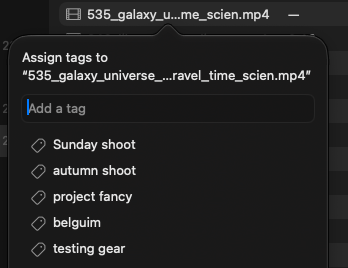
- Tag a whole folder at once: every video in it and its subfolders gets the tag.
- Tag files before they're indexed. Tags belong to files, so they're kept when you index or re-index.
- Your Finder tags are imported automatically (color tags are skipped). FrameSeek never writes to your files, so tags you add or remove in FrameSeek don't change Finder, and a Finder tag you remove in FrameSeek stays removed.
- A new Tags section in the sidebar lists your most-used tags. Click one to see every file that has it, from any folder or drive. Rename, merge or delete tags from the sidebar.
- Filter search results by tag. Tag filters combine with folder and label filters and are kept in saved searches. Searching while viewing a tag searches only that tag's files.
- Experimental: suggest tags from folder names, like "IKEA" for "20251120-IKEA". Turn it on in Settings › Tag Suggestions. Suggestions appear in the sidebar's Tags section, and nothing is tagged until you accept one.
File Browser
- Browse your footage from the sidebar: every subfolder of the folders you've added, with video counts, including videos that aren't indexed yet.
- Each folder lists its videos with their index status, in list or grid view. Select files (⌘-click, ⇧-click, ⌘A) and index just those, or index a whole subfolder from the sidebar.
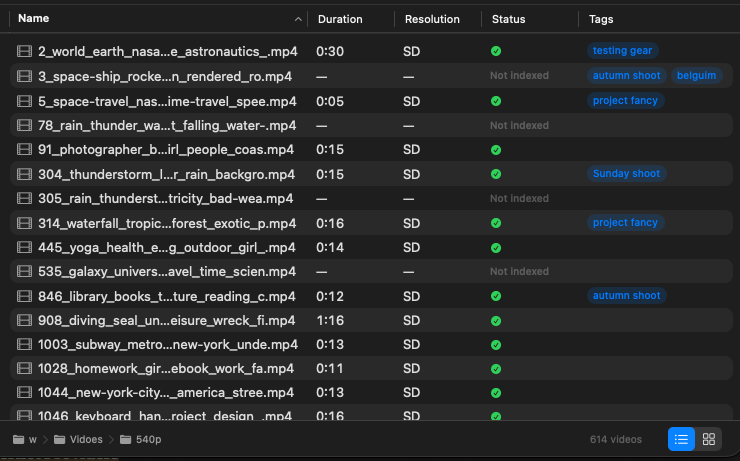
- Files that were indexed but are no longer on disk are marked as missing, and you can remove them from the index. If a drive is disconnected, you can still browse what was indexed from it.
- The Back button returns to exactly where you were: a folder, a tag, or a search with its query and filters.
- "Show in Enclosing Folder" on search results and tagged files opens the file's folder in the browser with the file selected.
Smarter Search
- Search now finds files by name, tag and folder, indexed or not, in a Files section above the scenes. Unindexed files have an Index button.
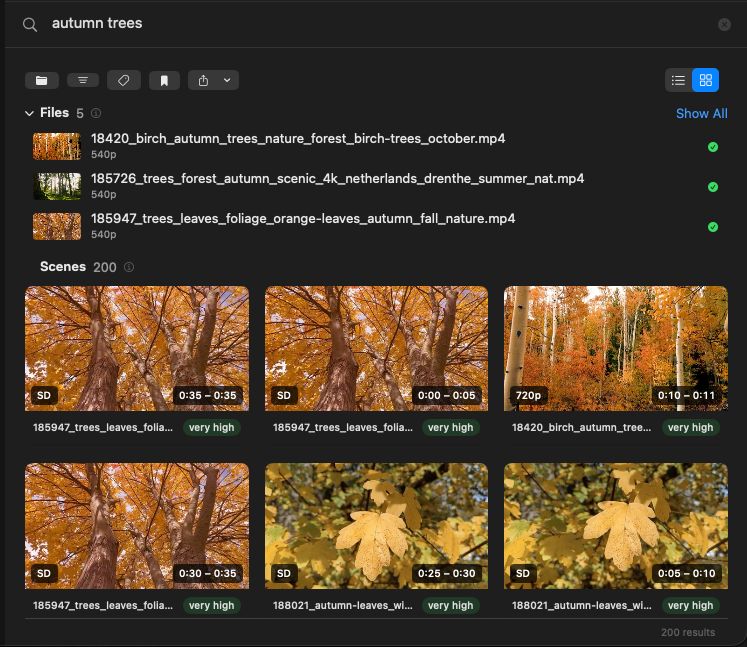
- Folder names, file names and tags now count toward scene ranking: "mallorca beach" puts the beaches from your Mallorca shoot first. The score breakdown shows when this applied.
- Spell correction no longer "corrects" names that appear in your folders, files and tags, like a person's name.
- The first search after launch is faster.
- Changing a filter while a search is running no longer loses the change.
Fixes & Improvements
- Sony clips (MP4 with big-endian PCM audio) now index on macOS 26 and later instead of failing.
- A video that can't be read no longer stops the whole indexing run. It's skipped and reported when the run finishes.
- Cancel now stops indexing right away instead of waiting for the current step to finish.
- Indexing that's interrupted (a crash or cancel) no longer leaves a video partly indexed.
- Re-indexing a folder on a disconnected drive no longer deletes that folder's index.
- Removing a folder whose name contains _ or % no longer affects folders with similar names.
- Fixed the sidebar's appearance on macOS 27.
- Quick Search picks up new labels from indexing without a restart, and shows an error if an export fails.
- AI models are now stored in FrameSeek's own folder in Application Support instead of the shared Hugging Face cache. Models you already downloaded are reused.
0.3.0 - September 16, 2026
Apple Intelligence (macOS 27)
- Local processing is now powered by Apple Intelligence on macOS 27. Frame descriptions run on the Neural Engine and it's 2.5x faster than before, no model download, and minimal RAM usage. On older macOS, the indexer falls back to Qwen as before.
- Transcription and frame description now require zero model downloads on macOS 27. Only a small embedding model (~86 MB) downloads on first use.
0.2.2 - September 11, 2026
Fixes
- Fixed a crash when opening Settings
- Changed default Gemini model to gemini-3.1-flash-lite, since older models are no longer available for new API keys. You can still select them in Settings if your existing key supports them.
0.2.1 - September 6, 2026
Faster Transcription on macOS 26+
- Added Apple SpeechAnalyzer transcription on macOS 26+. 1.5x faster, more accurate (2.1% vs 3.7% word error rate), no hallucinations, and no ~500 MB model download. On macOS 15 the indexer falls back to WhisperKit as before.
New UI Features
- Added list/table view for browse and search modes with sortable columns. Browse defaults to list, search defaults to grid, switchable via toolbar picker.
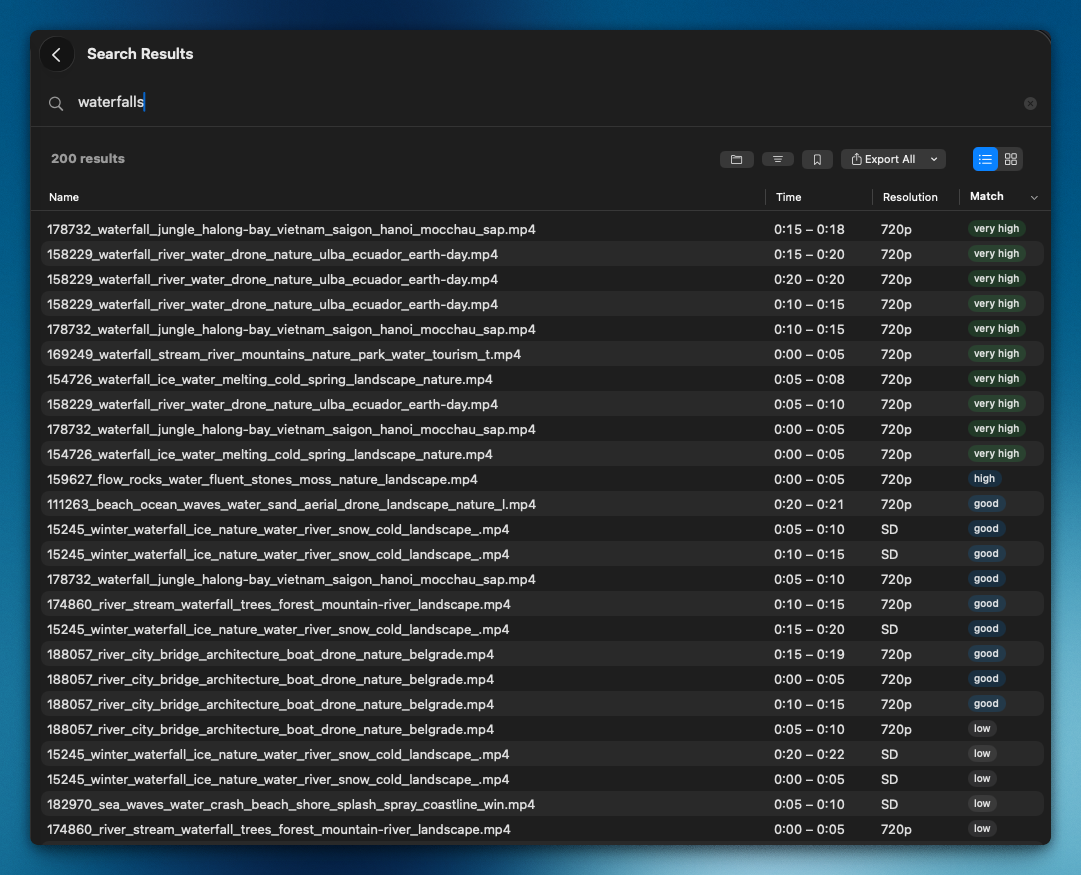
- Added multi-folder selection to the search results folder filter
- Added configurable keyboard shortcut for Quick Search (change it in Settings)
Fixes & Improvements
- Fixed local VLM indexing failing on macOS 15 with "Metal language version not supported" (metallib was compiled with macOS 26 Metal language version)
- Fixed hybrid search scoring: keyword boost is now weighted by the fraction of query words matched, label boost uses scene-specific labels instead of the global best, and stop words are filtered to reduce noise
0.2.0 - August 1, 2026
Quick Search
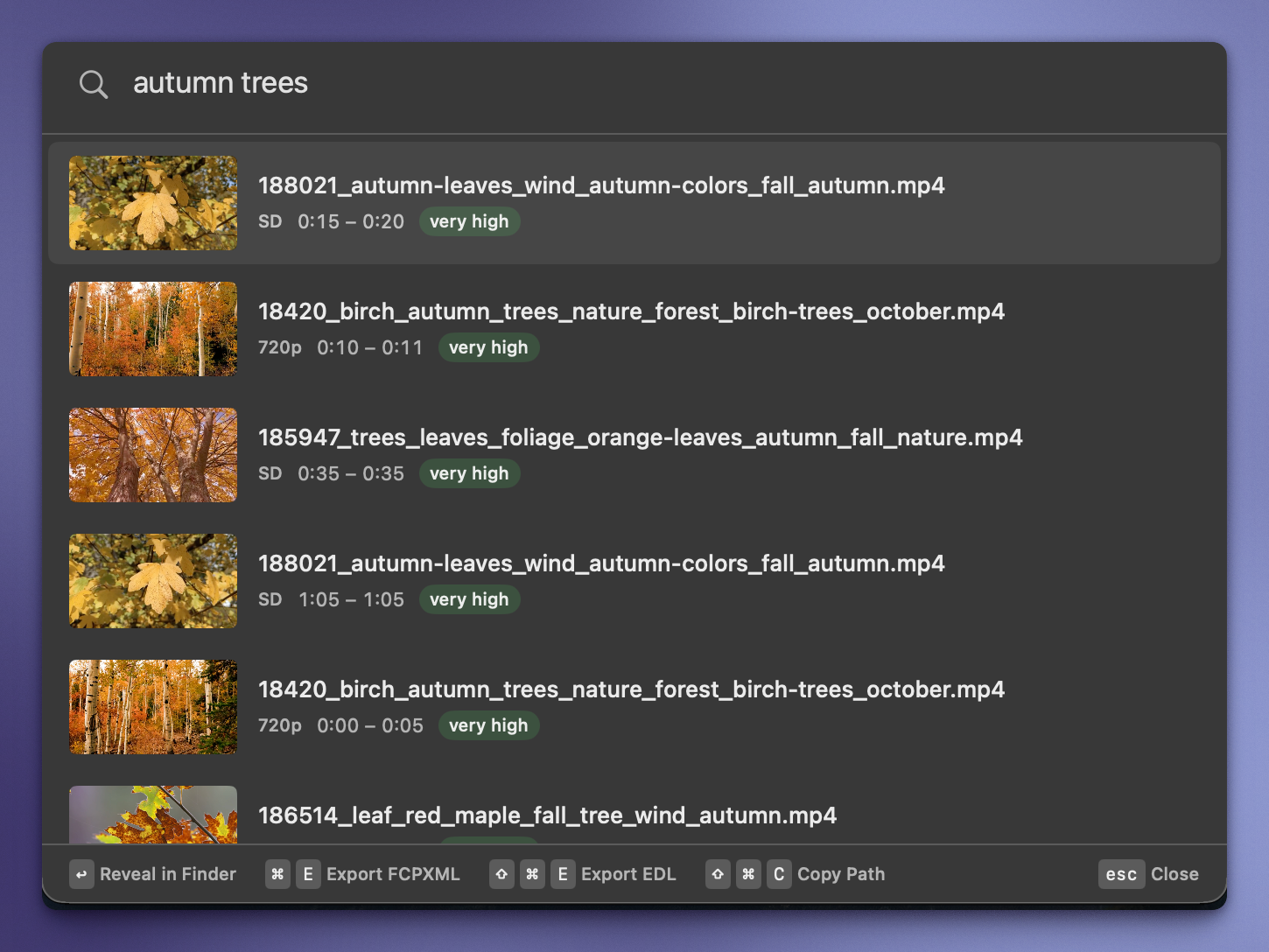
- Added Quick Search: a menu bar companion that lets you search your footage from any app with a global ⌥Space hotkey. Results show inline with thumbnails. Press Enter to reveal in Finder or ⌘E to export FCPXML.
- Quick Search can auto-launch at login (configurable in Settings, enabled by default)
Smarter Search
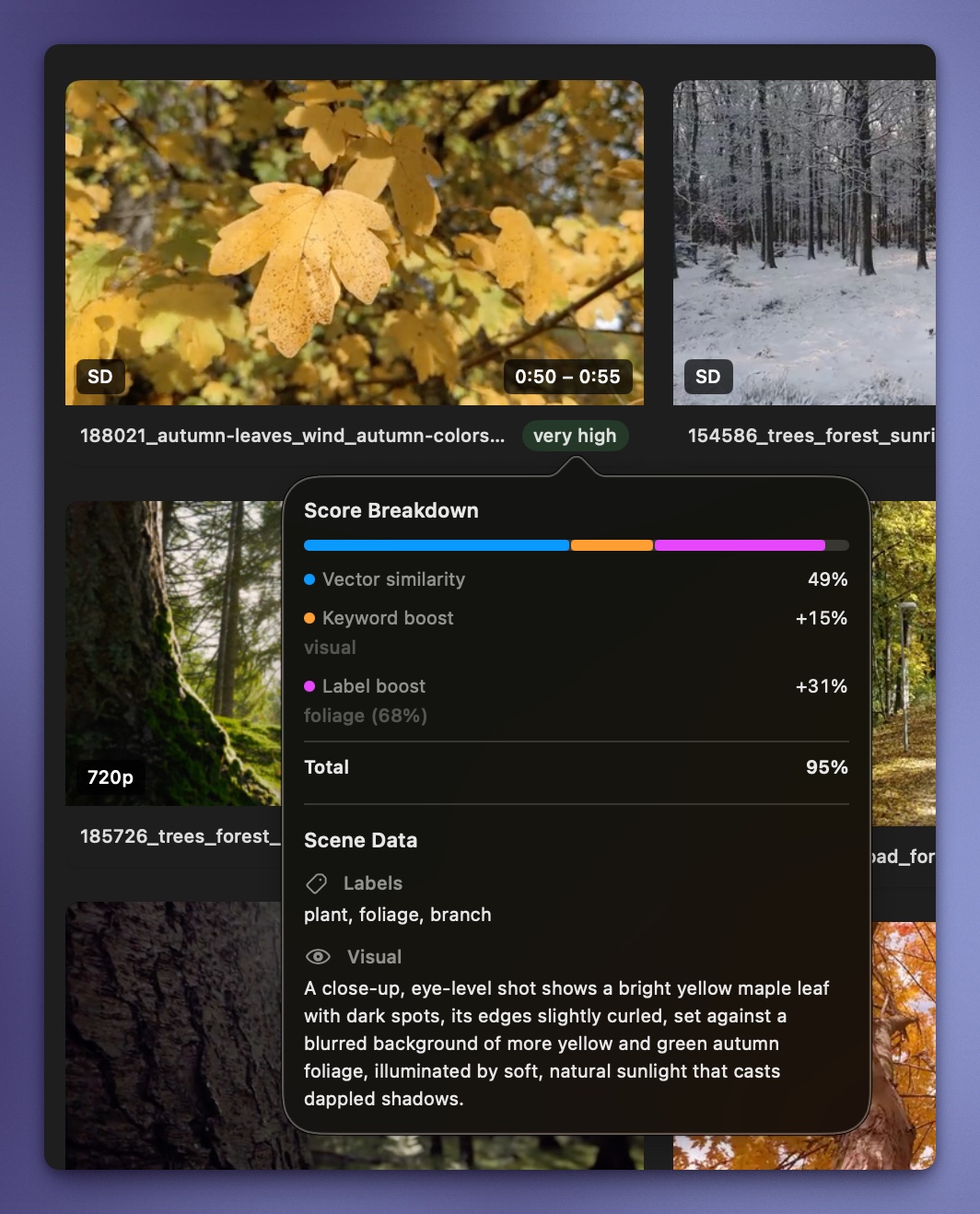
- Added hybrid search combining vector similarity, keyword matching, and label matching for significantly more accurate results
- Added spell-correction so typos still find the right scenes
- Added score breakdown popover showing how each result was matched (vector, keyword, label contributions)
- Added qualitative match labels (Excellent, Good, Fair) to search results
- Lowered similarity threshold and raised result limits for better recall
New UI Features
- Added saved searches in the sidebar for quick access to frequent queries
- Added folder filter in the results toolbar to narrow results by indexed folder
- Added masonry grid layout that properly handles portrait and mixed-orientation videos
- Added infinite scroll with skeleton loading for smoother browsing of large result sets
- Added configurable Gemini model selection (different versions of flash and flash-lite) with per-model cost estimates in Settings
Fixes & Improvements
- License deactivation now frees an activation slot, so you can move the app between machines
- Improved feedback form and error messages for better support workflow
0.1.6 - July 27, 2026
- Fixed local VLM processing not working in the installed app (Metal shaders were placed in the wrong bundle location)
0.1.5 - July 26, 2026
- Fixed a crash (exit code 255) when indexing in Gemini API mode
- Added diagnostic logging. Indexer writes system info, pipeline timing, and errors to a log file viewable via Settings > Open Logs Folder
- Fixed the "Remove folder" dialog reappearing on its own after re-indexing a previously removed folder
0.1.4 - July 14, 2026
- Added OCR text extraction and image classification (Apple Vision) to the indexing pipeline for richer, more accurate search results
- Added label filtering to browse and narrow results by detected scene categories
- Added EDL export format alongside FCPXML, with support for DaVinci Resolve and other NLEs
- Added video preview on hover in browse mode
- Improved indexing time estimates with per-chip calibration and a hardware lookup table covering M1-M5
- Refined sidebar, settings, and overall UI polish
0.1.3 - July 9, 2026
- Added Sparkle auto-update so the app can update itself in-place
- Added a welcome sheet for first-time users with a guided setup flow
- Improved error handling during indexing and in the settings view
- Refined search results UI, sidebar folder icons, and video count display
- Added download link to license activation emails